
Partner links on this page
Every button below marked partner link leads to the advertiser through a tracking link. If you sign up or install after clicking it, Atom Agentura s.r.o. receives a commission from the advertiser. It costs you nothing extra and the price or offer you get is the same as going direct.
Commission does not buy coverage: the assessments, the criticism and the corrections on this site are written independently of the advertiser, as set out in our editorial policy. RAID: Shadow Legends is free to download and contains optional, chance-based in-app purchases.
Is it really free? #
Yes, in the sense that matters: the download costs nothing, there is no paywall across the campaign, and you can play for years without paying. It is also monetised throughout, and the store sells exactly the two things the game keeps you short of — summoning attempts and time.
Both statements are true, and a page that gives you only one of them is advertising rather than describing.
What the store actually charges #
These figures are taken from the public store listings at the time of writing. Prices vary by country, currency and tax, and Plarium changes bundle contents frequently.
| Purchase type | Listed price range | Notes |
|---|---|---|
| One-off packs | about $0.99 to $99.99 | Ten tiers, from a small starter pack up to the largest bundle. Contents vary by promotion and usually mix currency, energy and shards. |
| Subscription cards | about $9.99 to $49.99 per month | Four tiers, delivering daily currency and benefits over the month rather than in one lump. |
| Chance-based bundles | sold within the ranges above | Bundles containing shards are lottery tickets. Steam labels the game as containing chance-based in-game purchases. |
Pack contents rotate constantly and prices differ between storefronts. The ranges above are the published price tiers; the only accurate description of today’s contents is the store page in front of you.
The currencies, and which ones matter #
- Silver — the everyday currency. Spent on levelling, gear upgrades and ranking up. You will be short of it constantly and it is farmed, not bought.
- Gems — the premium currency. Buys energy, shards, storage and convenience. Earned slowly through play, sold in every pack.
- Energy — not a currency exactly, but the real limit on your day. Refills on a timer, can be refilled with Gems.
- Shards — summoning tokens. See our summoning page.
If you spend Gems at all, most experienced players would tell you that energy refills and storage do more for an account than an extra handful of shards. Energy buys gear farming, and gear is what actually limits a mid-game account.
Subscription cards #
The four subscription tiers deliver their value daily across a month rather than immediately. Mechanically they are the most predictable purchase in the game: you know precisely what you receive. The trade-off is the obvious one — they create a reason to log in every day, which is the point of them.
What money does and does not fix #
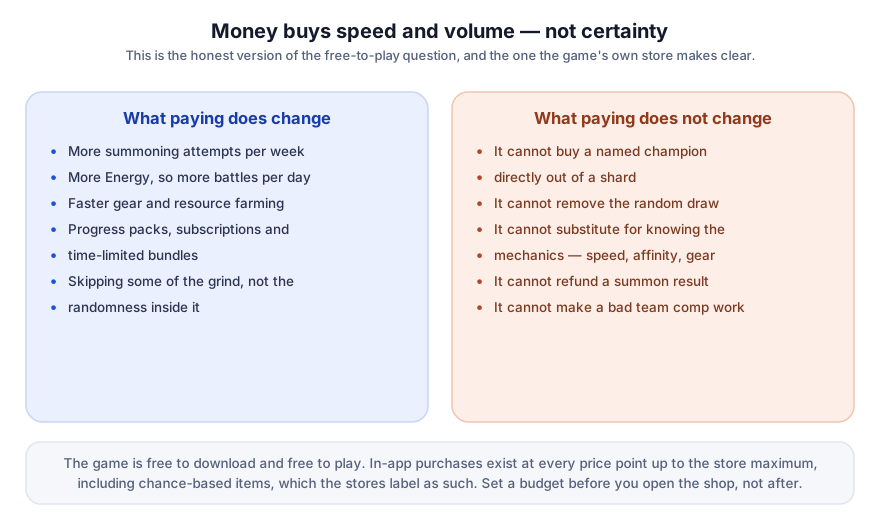
The most expensive mistake in this genre is not spending money. It is spending money on a specific outcome that money cannot deliver. A player who buys energy to farm gear gets exactly what they paid for; a player who buys shards to obtain one named champion is buying lottery tickets and may well end up buying more.
Spending controls that actually work #
- iOS: Screen Time → Content & Privacy Restrictions → iTunes & App Store Purchases → set In-app Purchases to Don’t Allow.
- Android: Google Play → Settings → Authentication, require authentication for every purchase, or use parental controls to block them.
- Steam: Family View can restrict store and in-game purchase access.
- Any platform: remove the stored payment method. It is cruder than the settings above and considerably more effective.
Chance-based purchases can be genuinely difficult to stop once started, and the psychology is not a personal failing. If gaming spend has caused you or someone in your household real problems, block purchases at the operating-system level and consider speaking to a support service in your country. No guide, including this one, is a substitute for that.
Refunds #
Purchases are made through Apple, Google, Steam or Plarium’s own store, not through this site, and refunds are handled by whichever of those took your money, under its own policy. As a consumer in the EU you may also have statutory rights in respect of digital purchases; those rights are against the seller, which is the platform or publisher — not against us, which sells nothing.
Download and judge the shop for yourself
It is free, and you can see every price before committing to anything.
Get RAID: Shadow Legendspartner linkPartner link. Atom Agentura s.r.o. earns a commission if you install through this link. It costs you nothing extra. The game is free to download and contains optional in-app purchases.
Read next
- Summoning and shardsWhat shard bundles actually buy.
- The main guideThe full picture, criticism included.
- FAQIs it pay to win? Short answer, with sources.
Sources
- Plarium Global Ltd — RAID: Shadow Legends official site — https://raidshadowlegends.com/
- Plarium support centre — game mechanics and affinity articles — https://raid-support.plarium.com/
- Apple App Store listing — size, minimum iOS version, age rating, in-app purchase list — https://apps.apple.com/us/app/raid-shadow-legends/id1371565796
- Steam store listing — Windows requirements, release date, purchase labelling — https://store.steampowered.com/app/2333480/RAID_Shadow_Legends/
- Wikipedia — RAID: Shadow Legends (release history, reception, marketing controversy) — https://en.wikipedia.org/wiki/Raid:_Shadow_Legends
Store listings and support pages were consulted on 21 September 2026. Live game figures change with each update: where this page and the publisher’s own information diverge, the publisher’s information prevails.